
Mercedes-Benz GLC : General notes / Declaration of conformity for wireless vehicle components
USA: "Radio based devices of this vehicle comply with Part 15 of the FCC Rules. Operation is subject to the following two conditions: 1) These devices may not cause harmful interference, and 2) These devices must accept any interference received, including interference that may cause undesired operation. Changes or modifications not expressly approved by the party responsible for compliance could void the user's authority to operate the equipment."
Canada: "This vehicle contains license-exempt transmitter(s)/receiver(s) that comply with Innovation, Science and Economic Development Canada’s RSS(s). Operation is subject to the following two conditions: (1) These devices may not cause interference, and (2) These devices must accept any interference, including interference that may cause undesired operation of the device."
USA: "Wireless charging system for mobile devices (model: WMI2 Wireless Mobile Interface): this device complies with Part 18 of the FCC Rules."
The name and address of the party responsible is:
peiker acustic GmbH
Max-Planck-Str. 28-32
61381 Friedrichsdorf Germany
 Operating safety
NOTE Plug-in hybrid
Observe the notes in the Supplement. You could otherwise fail to recognize dangers.
WARNING Risk of accident due to malfunctions
or system failures
To avoid malfunctions or system failures:
Always have the prescribed service and maintenance work as well any required repairs carried out at a qualified
specialist workshop...
 Diagnostics connection
The diagnostics connection is a technical interface
in the vehicle. It is used, for example, within
the scope of repair and maintenance work or for
reading out vehicle data by a specialist workshop...
Other information:
Mercedes-Benz GLC 2016-2026 Owners Manual: Removing condensation from the windows
W..
Mercedes-Benz GLC 2016-2026 Owners Manual: Overview of the symbols and functions in the radio menu
Additional functions of TuneIn radio A relatively large volume of data can be transmitted when using TuneIn Radio. Additional functions of the satellite radio SIRIUS XM® satellite radio offers more than 175 digital-quality radio channels providing 100% commercial-free music, sports, news and entertainment, for example...
Categories
- Manuals Home
- Mercedes-Benz GLC Owners Manual
- Mercedes-Benz GLC Service Manual
- Function of the interior motion sensor
- Overview of buttons on the steering wheel
- Using the 12 V socket
- New on site
- Most important about car
HANDS-FREE ACCESS function
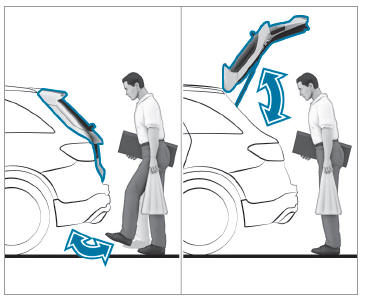
With HANDS-FREE ACCESS you can open, close or stop the closing process of the tailgate by performing a kicking movement under the rear bumper.
The kicking movement triggers the opening or closing process alternately.
Observe the notes when opening and closing the tailgate.
