
Mercedes-Benz GLC 2016-2026 Owners Manual / Opening and closing / SmartKey / Removing/inserting the emergency key
Mercedes-Benz GLC : SmartKey / Removing/inserting the emergency key
Removing the emergency key
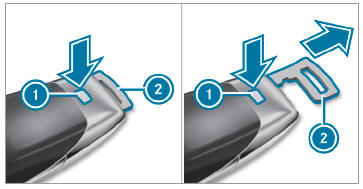
 Press release knob
 . Emergency key 2 is pushed out slightly.
 Pull out emergency key
 until it engages in the intermediate position.
 Press release knob
 again and fully remove emergency key
 .
.
Inserting the emergency key
- Press release knob
 .
. - Insert emergency key
 to the intermediate
position or fully until it engages.
to the intermediate
position or fully until it engages.
You can use the intermediate position of
emergency key  to attach the SmartKey to
a key ring.
to attach the SmartKey to
a key ring.
 Deactivating the SmartKey functions
If you do not use the vehicle or a SmartKey for
an extended period of time, you can reduce the
energy consumption of the respective SmartKey.
To do so, deactivate the SmartKey functions...
 Replacing the SmartKey battery
DANGER Serious damage to health
caused by swallowing batteries
Batteries contain toxic and corrosive substances.
Swallowing batteries may cause
serious damage to health...
Other information:
Mercedes-Benz GLC 2016-2026 Owners Manual: Replacing the rear window wiper blade
WARNING Risk of becoming trapped if the windshield wipers are switched on while wiper blades are being replaced If the windshield wipers begin to move while you are changing the wiper blades, you can be trapped by the wiper arm. Always switch off the windshield wipers and the ignition before changing the wiper blades...
Mercedes-Benz GLC 2016-2026 Owners Manual: Towing the vehicle with both axles on the ground
Observe the notes on the permitted towing methods. Make sure that the battery is connected and charged. Observe the following points when the battery is discharged: The engine cannot be started The electric parking brake cannot be released or applied Vehicles with automatic transmission: The automatic transmission cannot be shifted to position or Vehicles with automatic transmission: If the automatic transmission cannot be shifted to position , or the multifunction display in the instrument cluster does not show anything, have the vehicle transported away...
Categories
- Manuals Home
- Mercedes-Benz GLC Owners Manual
- Mercedes-Benz GLC Service Manual
- Opening and closing the hood
- Overview of buttons on the steering wheel
- Raising the vehicle when changing a wheel
- New on site
- Most important about car
HANDS-FREE ACCESS function
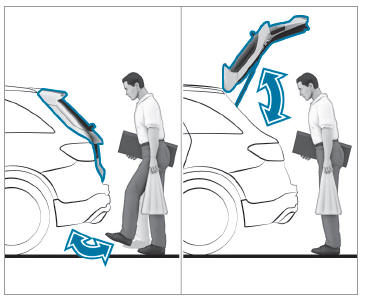
With HANDS-FREE ACCESS you can open, close or stop the closing process of the tailgate by performing a kicking movement under the rear bumper.
The kicking movement triggers the opening or closing process alternately.
Observe the notes when opening and closing the tailgate.

Copyright © 2026 www.meglc.net